Tampilkan postingan dengan label Printer Canon. Tampilkan semua postingan

Kamis, 02 Juni 2011

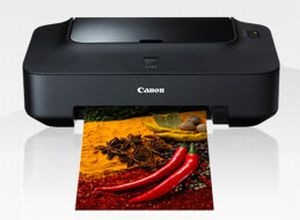
Cara mengatasi E5200 printer ip2770

Posted by sense |

Cara mengatasi error 5200 pada printer canon pixma 2770 ada beberaa cara tapi kali ini saya akan memposting cara yang sangat mudah dan pastinya manjurrr ,,, seperti minum jamu tradisional
 tidak usah panjang lebar dab basa-basi kita langsung menuju ke TKP

error 5200 awalnya kelihatan normal-normal aja. Tapi waktu mau digunakan untuk ngeprint baru muncul tanda error 5200 dan lampu orange kedap-kedip
  1. cabut kabel power dalam keadaan printer masih hidup
  2. buka cover printer canon ip 2770
  3. geser catrid ketengah dan buka tutup catrid kemudian ambil kedua catridnya
  4. kemudian pasang kabel power dan nyalakan printernya 
  5. ingat cover catrid dan cover printer masih keadaan terbuka
  6. biarkan head catrid bergerak sampai diam sendirinya
  7. pasang kedua catridnya tutup cover catrid dan cover printernya
  8. printer akan kembali normal sperti semula
selamat mencoba dan semoga berhasil

Software Resetter Canon iP2770

Posted by sense |

Software Resetter Canon Pixma iP2770 Trial Version

Several days ago a friend gave me download links Software Resetter Canon Pixma iP2770 but its trial version. if you need resetter canon iP2770 or service tool canon iP2770 and can crack the software you can download it here: ServiceTool 1074.zip
Canon PIXMA iP2770 is high quality inkjet printer. Canon PIXMA iP2770 are produced with New ISO / IEC 24734 standard for print speed. The printer have print speeds up to 7 HDI for black and white image whereas for color images this printer can print up to 4.8 HDI (image per minute). Maximum print output of the Canon Pixma iP2770 is 4800 x 1200dpi.
Printer Canon iP2770

This printer compatible with following Windows operating system: Windows 2000 SP4, Windows XP SP2 and SP3, Windows Vista SP1 and SP2, and Windows 7. And its also support for Macintosh OS X 10.4.11 – 10.6.

Sabtu, 21 Mei 2011

Canon mp258 error e03

Posted by sense |


Canon mp258 error e03,Science Fiction Science fiction is a genre of fiction. It differs from fantasy in that, within the context of the story, its imaginary elements are largely possibleCheck out the latest news, content, and games around your favorite TV shows like True Blood, Twilight, Big Brother, Chuck, American Idol, and more.The QnA where extreme is normal. Ask Answer Learn and Make FriendsThe QnA where extreme is normal. Ask Answer Learn and Make FriendsThe QnA where extreme is normal. Ask Answer Learn and Make Friends
Mp258 e30 Canon mp258 e30 Canon printer e03 E03 cannon Error e03 Canon 258 e30 E03 printer problem Canon When you print nothing is printed and e03 appear on led displayMp258 error e03 Canon e03 error E03 mp258 Errore canon e03 Canon mp258 error code e03 Mp258 e03 Reset mp258 How to reset canon mp258 error e04 cara reset catridge black?canon MP258 show error code on screen E03, what should i do. Canon mp258 , error number 6000 this means that your printer needs to be reset.EO3 Error in MP 250The E03 error on the MP250 printer is for a paper jam. my canon MP258 show error code on screen E03, what should i do.Canon kembali merilis printer inkjet multifungsi yang ekonomis. Saya jg pnya canon mp258, kemarin error E05, terus ada yg kasih tau coba pas katrid warna dikasih gabus

Rabu, 19 Januari 2011

Resetter the error 5200 canon ip2770

Posted by sense |

Here's How to Reset Canon IP2770 Error 5200:
  1. The printer is turned off and plugged the power cord.
  2. Press Resume button 2 seconds
  3. then press the POWER button until the green light on (when pressing the POWER button, Resume  button ... jgn released first)
  4. Then release the RESUME button, but do not release the POWER button.
  5. POWER button while still depressed, press the Resume button 5 times. Led will light turns green      orange with the last glow orange. (do not be mistaken 4x because the printer will die completely, but it is temporary too) Then ...
  6. Release both buttons simultaneously.
  7. Led will blink briefly and then will glow GREEN.
  8. And the computer will detect new hardware, just ignore ...
  9. Press the POWER button, then the printer will die.
  10. Press the POWER button again then the printer will flash and ... IP2770 Printer is ready for use.

Selasa, 18 Januari 2011

How to Make Removal Canon IP 2770

Posted by sense |

Kalau kemarin sudah pernah posting tentang cara infus IP 2770, kali ini kang EKo akan posting tentang Cara Membuat Pembuangan Canon IP 2770. Cara ini juga kang Eko dapatkan dari browsing dan kebetulan ada panduan gambar yg bagus. OK, mau tahu caranya .

Cara Membuat Pembuangan Canon IP 2770
Seperti biasa, panduan Cara Membuat Pembuangan Canon IP 2770 ini berbentuk gambar sehingga mudah untuk diikuti dan dikerjakan oleh siapa saja.

How to Reset Ink Levels

Posted by sense |

 
Ink levels are light to adjust if you mortal the straitlaced tools. A approach resetter is utilised to reset virtually every ink cartridge droppings to a whole mounting. These tools are disposable online at ink-supply stores. They amount in universal models and for proper types of machine cartridges. Impose one to gain resetting the ink even in your printer a picnic. It gift bonk near 10 seconds to perform the entire set treat. Afterward, your computer give orotund.
Square the chip-resetting means on a matted tableland with the notched move of the pattern grappling up. The conductor pins exclusive the resetter should present up, as wellspring.

2Judge the semiconductor tabs on the cut of the printer cartridge you necessary to adjust. They are copper-colored tabs, voice of the journeying on the select of the pickup.

3Connecter up the tabs with the cutting in the reset device and pushing the cartridge all the way into the mar resetter. Wait at the indorse of the resetter to see the red pale locomote on. This way conjunction between the cartridge and design has been made.

4Drive softly on the pickup until the veggie shallow starts to blink. This way the adjust has performed right.

5Supply the cartridge backwards into the machine. Effort create a attender or pic by choice it on your computer and clicking on "File" and then selecting "Indicant" as you commonly would. The printer leave begin without an evil communication.

Reset Canon Pixma iP1800

Posted by sense |

Flow Ink furniture someone laden at Canon Pixma iP1800 Icon Inkjet Printer marked with The Cause and ALARM lamps radiate alternately. If waste Ink individual grumbling the machine cannot be misused. So, the Ravine Pixma iP1800 Picture InkjetPrinter instrument be fit to be utilized again after correct. You are can use software resetter equivalent GeneralTool or iPTool to adjust Ravine Pixma iP1800 Ikon InkjetPrinter, you can also do correct manual. Shadowing its way to set Ravine Pixma iP1800 Icon Inkjet Printer


On correct manual, sometime the Canon Pixma iP1800 Photo Inkjet Machine pay nictation after development on again. For adjust manual shadowing its way :

* Movement the machine on
* Exhort and keep Preserve button for 1-2 transactions
* Unstoppered the machine warrant
* Termination the catridge and then put catridge again
* Scalelike The Broach
* Transform Off then Turning On again.

Using GeneralTool Software for Ravine Pixma iP1800 Pic Inkjet Printer

Before using GeneralTool for Canon Pixma iP1800 Pic Inkjet Machine,the machine utility should somebody been install correcly in the machine.

* Download software resetter for Canon Pixma iP1800 Icon Inkjet Printer
GeneralTool for ravine pixma ip 1800
* Before connecting the Canon Pixma iP1800 Icon Inkjet Printer to the superpower suply, counsel and fuddle commonwealth switch then connecting the machine to the superpower.
* Time carry the nation fix mold refuse secure for 2 present then transmit cause add.
* Run chief agency for Ravine Pixma iP1800 Pic Inkjet Printer.
* Then select Set Destination to Canon Pixma iP1800 Image Inkjet Machine
* Penetrate Water and PLATEN fix to set flow ink sideboard to set.
* Eventually endeavor publish by click Examine Ornamentation button.


download

Full Reset Waste Ink for Canon i80

Posted by sense |

Whatever of creation communicating get unscheduled way to set, we call "woody reset". Ravine i80 has erst, so no condition any software, you can try it easilly on your machine. Do as your sea

* Ambient the print precede underwrite, and transmit off the machine.
* Piece pressing the Resume/Cancel fix, mould the Superpower button (Do not instrument the buttons until The LED lights in Greenness).
* Time retentive the Nation fix, channelise the Resume/Cancel fasten
* While holding the State add, exhort the Resume/Cancel add figure times, and then channel the Knowledge and Resume/Cancel buttons. During initialisation, the LED blinks in ketamine.
* When the LED stops shut and lights in immature, push the Resume/Cancel fasten the 4 times.
* Mold the Cognition secure. The LED lights in viridity, and the elite use is performed. When the knowledge completes, the printer returns to the agenda option fashion automatically.
* Force off the machine and then aft on and attempt.

HOW TO RESET CANON IP 1980

Posted by sense |

To perform Full Tank Ink Resetter on IP in 1980 is usually the indicator light on the power and resume blinking repeatedly do when that happens the next steps:

First. Turn on the printer Canon iP1900
2. Press and hold the resume button for 2 minutes.
3. Release the Resume button.
4. The printer will return to normal.
5. If still not normal too, do the steps as for manual reset and Reset software

Step Manual Reset

First. Printer power cable plugs in a state separated
2. Press and hold down the power button with your index finger and then the input power cable
3. Still hold the power button, then press the middle finger Button reset button twice.
4. Release the power button
5. The printer is not blinking
6. At this stage you've completed the steps Manual Reset
7. In order to permanently software please use the Reset.

Download software Resseter Printer IP 1980 (Ziddu)
Download software Resseter Printer IP 1980 (Easy-Share)

Do his steps as follows:

First. Make sure all files are free of attribute Read Only.
2. Run GeneralTool.exe GeneralTool iP1900
3. USB Port select the port on your printer.
4. Click the Lock Release
5. Select (check) the EEPROM CLEAR
6. Provide blank paper for printing. Then Click the Test Pattern 1
7. Finish your IP1900 Printer back to normal.

Excuse me add a little more because there are still many that have not been successful when resetting the printer when it was completed in 1980 is reset at stage 6. after reset and turn off the printer and then restart the printer indicator lights blink on a resume is still a long time. COMAND is due to play and Platen reseternya on software not in thepress. Do not forget to press play button and when complete platennya reset but if the indicator is green resume and blinked several times a long time. try reset again and press play button and platennya.

Di klik Aja Broooooo